

Mastering Web Accessibility with WAI-ARIA: What You Need to Know About ARIA Roles and Their Impact

Jeffrey Rodgers
October 11 11 min read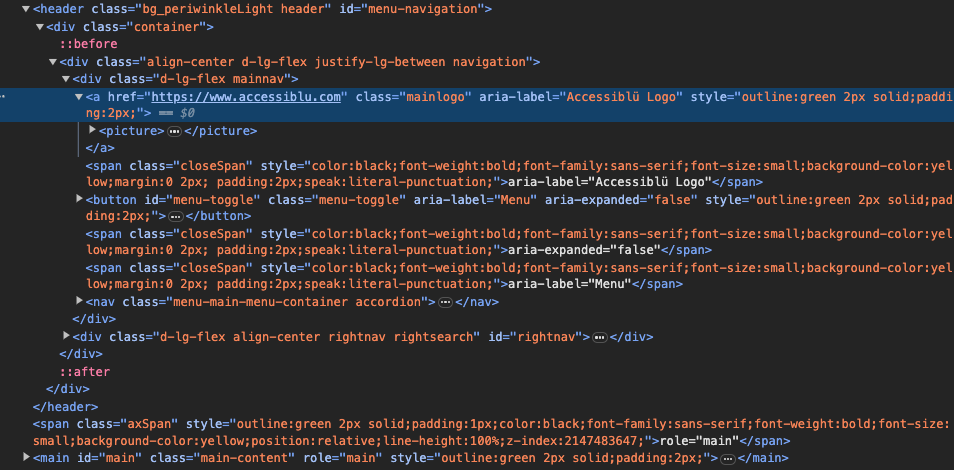 Image Caption
In today’s digital age, understanding WAI-ARIA roles is crucial for mastering web accessibility. It ensures that websites and web applications are usable by people with disabilities, providing equal access and opportunity for all users. WAI-ARIA (Web Accessibility Initiative – Accessible Rich Internet Applications) plays a crucial role in achieving web accessibility. By understanding and implementing ARIA roles, web designers and developers can greatly enhance the accessibility of their websites.
Web accessibility and WAI-ARIA
Web accessibility requires the inclusive practice of designing and developing websites and web applications that people of all abilities can use. It is essential for creating an inclusive digital environment where everyone can access and interact with online content.
WAI-ARIA, developed by the World Wide Web Consortium (W3C), is a set of specifications and guidelines that provide web developers with the tools and techniques to make their websites more accessible. It introduces a set of roles, properties, and states that can be added to HTML elements to enhance their accessibility for users with disabilities.
What is WAI-ARIA and how does it work?
WAI-ARIA stands for Web Accessibility Initiative – Accessible Rich Internet Applications. It is a technical specification that helps web developers create accessible web content and applications. WAI-ARIA works by adding additional information to HTML elements, such as roles, properties, and states, which assistive technologies can interpret and convey to users with disabilities.
The main goal of WAI-ARIA is to bridge the accessibility gap between traditional desktop applications and web applications. By providing a standardized way to enhance the accessibility of web content it enables users with disabilities to interact with websites and web applications more effectively.
Overview of ARIA roles and their significance in web design
ARIA roles are a key component of WAI-ARIA and play a crucial role in enhancing the accessibility of web design. ARIA roles define the purpose and behavior of HTML elements, allowing assistive technologies to understand and communicate their meaning to users with disabilities.
One of the core aspects of the ARIA system is its collection of roles. A role in accessibility terms is a shorthand indicator for a specific user interface pattern. ARIA provides a vocabulary of these roles that can be assigned to any HTML element using the role attribute.
ARIA roles are categorized into four main types:
- Landmark roles: These roles denote large areas of a document, such as banner, search, and region. They provide assistive technologies with a way to identify different parts of a webpage for easier navigation.
- Widget roles: These roles are used to make interactive elements accessible. Roles like button, checkbox, radio, etc., fall under this category.
- Document structure roles: These roles provide information about a non-interactive, static section of the page. Common document structure roles are article, table, and heading.
- Abstract roles: These are the foundation roles upon which other WAI-ARIA roles are based. Browsers and assistive technologies primarily use abstract roles and are not meant for developers to use directly.
By using ARIA roles, web designers can ensure that their websites are more accessible to users with disabilities. This improves the user experience for those users and helps websites comply with accessibility standards such as WCAG (Web Content Accessibility Guidelines).
The Power of ARIA States and Properties
In addition to roles, ARIA also provides states and properties. These are dynamic attributes that provide additional information about an element’s current condition or state. Some common ARIA states include aria-checked for checkboxes, aria-expanded for collapsible content, and aria-hidden for visually hidden content but still accessible to screen readers.
On the other hand, ARIA properties are static and don’t change once set. They provide extra semantics or context to an element that are not available with native HTML. Examples of ARIA properties include aria-labelledby to provide an accessible name to an element, aria-describedby for additional descriptive text, and aria-required to indicate a required field in a form.
A comprehensive guide to ARIA roles and their usage
To fully understand and utilize ARIA roles, it’s important to have a comprehensive guide that outlines their usage. Here, we’ll provide an overview of common ARIA roles and how they can be used in web design.
Common ARIA roles and their usage in different elements
- Role=”banner”: This role is used to identify a webpage’s main header or banner. It helps screen reader users quickly understand the purpose of the content.
- Role=”navigation”: This role is used to mark navigation elements, such as menus or site maps. It assists users in finding their way around a website.
- Role=”main”: This role is used to identify the main content area of a webpage. It helps assistive technologies focus on the most important information.
- Role=”contentinfo”: This role is used to identify the footer or the end of the main content area. It provides additional information about the content.
These are just a few examples of ARIA roles and their usage. By leveraging ARIA roles effectively, web designers can enhance the accessibility of their websites and improve the user experience for all users.
Practical examples of using ARIA
To illustrate the practical usage of ARIA roles, let’s consider an example of a dropdown menu. By adding the ARIA role “combobox” to the parent element and “option” to the individual menu items, we can create an accessible dropdown menu that users with disabilities can easily navigate.
<div role=”combobox” aria-haspopup=”listbox”>
<button aria-expanded=”false” aria-haspopup=”true” id=”dropdownButton”>Choose an option</button> <ul role=”listbox” aria-labelledby=”dropdownButton”>
<li role=”option”>Option 1</li>
<li role=”option”>Option 2</li>
<li role=”option”>Option 3</li>
</ul>
</div>
ARIA Checkbox Example
Let’s consider a practical example where we want to create a custom checkbox using a div element. Here’s how we can use an ARIA role to achieve this:
<div class=”custom-checkbox” role=”checkbox” aria-checked=”false” tabindex=”0″>
Custom Checkbox
</div>
In this example, we’ve assigned the role=”checkbox” to the div, indicating that it should behave like a checkbox. The aria-checked attribute is used to represent the state of the checkbox, and the tab index property ensures the element is keyboard accessible.
Using ARIA States and Properties
Consider a scenario where we have an accordion-style collapsible content section on a webpage. Here’s how we can use ARIA states and properties to make it more accessible:
<button aria-expanded=”false” aria-controls=”contentId”>
Toggle Content
</button>
<div id=”contentId” hidden>
This is the collapsible content.
</div>
In this example, the aria-expanded state informs assistive technologies whether the collapsible content is currently expanded or collapsed. The aria-controls property associates the button with the div that contains the actual content.
By using ARIA roles in this example, we have provided assistive technologies with the necessary information to convey the dropdown menu’s purpose and functionality to users with disabilities.
Best practices for using ARIA roles in web design
While ARIA roles can greatly enhance web accessibility, it’s important to follow best practices to ensure their effective usage. Here are some best practices for using ARIA roles in web design:
- Use ARIA roles only when necessary: ARIA roles should be used to enhance accessibility, not as a replacement for native HTML semantics. Use ARIA roles judiciously and prioritize using semantic HTML elements whenever possible.
- Provide alternative text for non-text content: For images or other non-text content, use the “alt” attribute to provide alternative text that describes the content’s purpose or meaning.
- Ensure ARIA roles are properly implemented: Make sure ARIA roles are implemented correctly and consistently across your website. Test your website using assistive technologies to ensure that ARIA roles are being interpreted correctly.
- Keep ARIA attributes up to date: As web technologies evolve, it’s important to stay up to date with the latest ARIA attributes and their usage. Regularly review and update your website’s ARIA implementation to maintain compatibility and accessibility.
By following these best practices, web designers can maximize the impact of ARIA roles in enhancing web accessibility.
Common challenges and pitfalls with ARIA roles
While ARIA roles can greatly enhance web accessibility, web designers must be aware of common challenges and pitfalls. Here are some of the challenges you may encounter when implementing ARIA roles:
- Overuse of ARIA roles: Using ARIA roles excessively can lead to confusion and make it difficult for assistive technologies to interpret the content. Use ARIA roles sparingly and only when necessary.
- Inconsistent implementation: Inconsistently implementing ARIA roles across your website can cause confusion and hinder accessibility. Ensure that ARIA roles are consistently applied to similar elements throughout your website.
- Lack of testing: Failing to test your website using assistive technologies can result in incorrect or ineffective ARIA implementations. Regularly test your website to ensure that ARIA roles are being interpreted correctly and provide the intended accessibility enhancements.
By being aware of these challenges and pitfalls, web designers can overcome them and ensure the effective implementation of ARIA roles in web design.
WAI-ARIA and WCAG compliance
WAI-ARIA and WCAG (Web Content Accessibility Guidelines) go hand in hand when it comes to web accessibility. WCAG provides a set of guidelines and success criteria that define the accessibility standards for web content, while WAI-ARIA provides the technical specifications and tools to achieve those standards.
By implementing ARIA roles per WCAG guidelines, web designers can ensure that their websites comply with accessibility standards and provide an inclusive user experience for all users.
Need to know more about the new WCAG 2.2 guidelines? Check out our WCAG 2.2 Update Insight.
Testing and evaluating the accessibility of your website with ARIA roles
Once you have implemented ARIA roles in your website, it’s crucial to test and evaluate its accessibility. There are several tools and techniques available to help you with this process:
- Screen readers: Use screen readers such as JAWS, NVDA, or VoiceOver to navigate and interact with your website. This will help you identify any issues or inconsistencies in the interpretation of ARIA roles.
- Accessibility validators: Utilize accessibility validators like WAVE or ANDI to scan your website for accessibility issues. These tools can help identify any ARIA-related problems and suggest solutions.
- User testing: Conduct user testing with individuals who have disabilities to gather feedback on the accessibility of your website. Their insights can provide valuable information on how ARIA roles are impacting their user experience.
Utilizing these testing and evaluation methods ensures your website is accessible and inclusive for all users.
Need more info about creating accessible websites? Check out Accessiblü’s Guide to Creating Inclusive Websites
Tools and resources for mastering web accessibility with WAI-ARIA
To master web accessibility with WAI-ARIA, there are several tools and resources available that can assist you in the process:
- Accessiblü: Accessiblü is a leading accessibility consulting agency that specializes in digital accessibility. They offer comprehensive services and resources to help organizations create inclusive web experiences. Reach out to Accessiblü for any questions or assistance with digital accessibility.
- W3C WAI-ARIA Spec: The official ARIA page of the W3C.
- W3C WAI-ARIA Authoring Practices: The W3C ARIA Authoring Practice Guide provides detailed authoring practices for implementing WAI-ARIA roles. This resource offers guidance on how to use ARIA roles effectively and provides examples of their implementation.
- ARIA-Examples GitHub Repository: The ARIA-Examples GitHub repository is a collection of code examples demonstrating ARIA roles’ usage in different web design scenarios. It can be a valuable reference for implementing ARIA roles in your projects.
By utilizing these tools and resources, you can gain a deeper understanding of web accessibility and master the implementation of ARIA roles in your web design projects.
Conclusion: Embracing inclusivity through web accessibility with WAI-ARIA
Web accessibility is crucial for creating an inclusive online environment where everyone can access and interact with web content. WAI-ARIA provides web designers and developers with the tools and techniques to enhance accessibility through the usage of ARIA roles.
By understanding the significance of ARIA roles and their impact on web design and user experience, we can create websites that are more accessible and inclusive. Let’s work together to create a more inclusive web experience and reach out to Accessiblü for questions on digital accessibility. Together, we can ensure that the web is accessible to all users, regardless of their abilities.
June 23 12 min read
Let’s be honest—diving into WCAG (Web Content Accessibility Guidelines) can feel like trying to read a technical manual written by…...
 September 19 11 min read
Digital accessibility is a complex challenge. Businesses often struggle to know where to start, lacking a clear understanding of how…...
 April 25 3 min read
Accessiblü Insight This Ablü Insight focuses on how to properly use ARIA (Accessible Rich Internet Applications) labels. This is an…...